Private by design — it lives on your Mac

Hire a townof AI workers.

FukaiHiro is a cozy pixel village that's secretly an AI workforce — living entirely on your computer. It answers your texts in your voice, researches and files what it learns, runs whole departments on a schedule, and cleans up after itself. Nothing is sent, deleted, or decided without your say.

Download FreeMac & Windows · unzip · run NO ACCOUNT · NO CLOUD · NO TELEMETRY · YOUR MACHINE

To think, it needs an AI brain — your pick: run a free one on your computer (LM Studio/Ollama), or paste an API key (OpenAI, OpenRouter…) if it can't. Two-minute setup either way. First launch, your OS may warn about a new app — Mac: right-click → Open; Windows: More info → Run anyway.

// What it does for you

Hire as many as you want.

Every villager is a governed AI with rules you can read before you hire it — and there's no cap. Add as many workers as your machine can run. Here are six to get the idea.

Answers your texts — in your voice

The Courier reads your messages and drafts replies that sound like you. It can only ever send to people you've explicitly trusted, every send is logged, and calendar events land straight on your Mac.

Runs departments while you sleep

A Board is a working team — AI suits, hand-off rules, quality control, a schedule. "Every morning at 8" actually happens, and the finished work still waits for your approval.

Researches & remembers

The Library reads only from sites you've approved and pins what matters to a shelf every worker can use. An R&D scout taps your shoulder when something on the frontier is worth your time.

A Mayor who knows you

Talk like a friend — voice, choices, or keyboard. He remembers what matters, files your notes, drafts your emails, and tidies his own records when the town is quiet.

Nothing vanishes without a receipt

AI never hard-deletes your stuff. Removals wait in a dumpster you review — approve the pickup and a truck literally hauls them off. Every pickup is receipted.

The internet, on your terms

The whole village reads the web through one gate with an approved reading list — like every serious AI platform, except you hold the list. Your API keys are never shown to the AI at all.

// How your privacy actually works

Turn off your Wi-Fi.
It still works.

No "we respect your privacy" claim survives an airplane-mode test — a local app just passes it. Your texts, files, and AI live on your Mac, full stop. Here's the honest version, one caveat included.

Kill your internet — it keeps running

Airplane mode on, the village still works. That's not a setting you can forget to switch on; it's the architecture. Check it yourself in five seconds.

No account. No server.

Nothing to sign up for — no email, no login. There's no server that could store your data, because there is no server. You can't leak what was never collected.

You approve everything that leaves

Every action that reaches outside your Mac — a text, a web read, a calendar event — shows you exactly what it'll do and waits for your yes. A visible gate, not a promise.

You choose where it thinks

Local mode: a free AI on your Mac (LM Studio/Ollama) — nothing leaves, full stop. Cloud mode: paste an API key for machines that can't run local AI — then the thinking goes to that provider, and we say so plainly. Your call, and "never leaves" is always an option.

// Straight from the village

This is the actual game.

Real screens, no mock-ups. It runs as a living pixel town — or flip to a plain desk view with dashboards and inboxes and zero whimsy. Same brain, two faces.
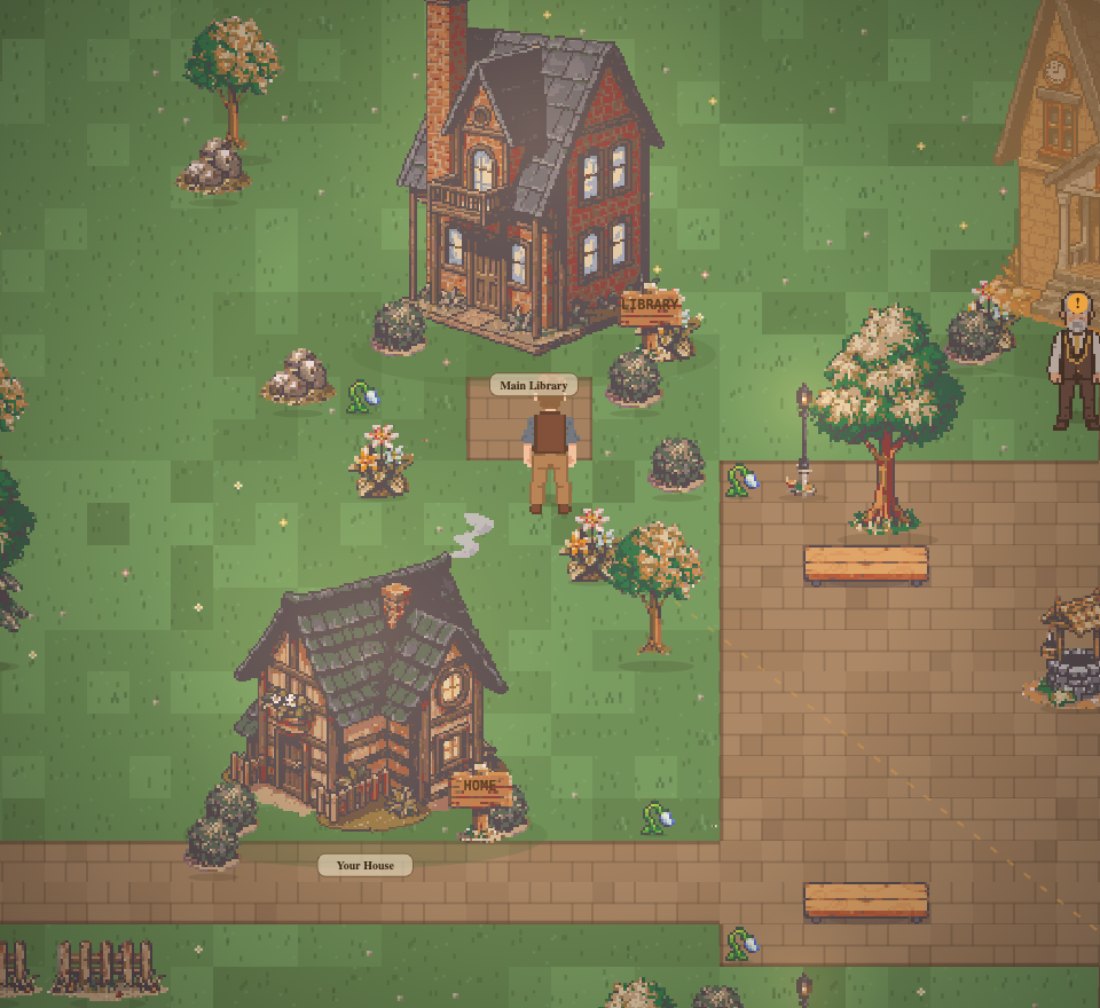
The village at golden hour
Golden hour in the square — walk up and talk to your Mayor
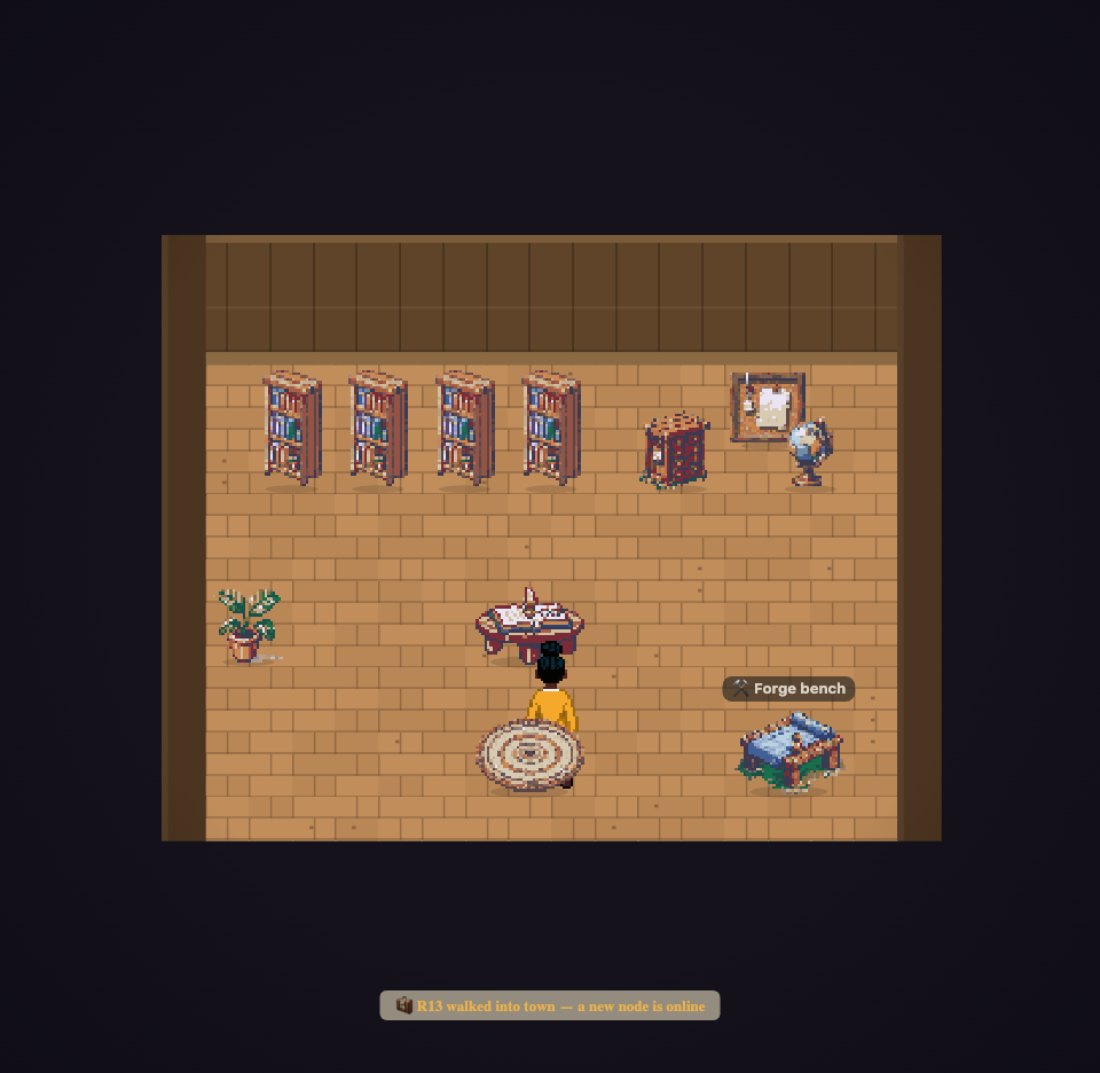
Inside the Library
Interiors are your tools — every object is a port to real work

// Systems, not apps

Whole teams, ready to run.

A board isn't an app — it's a department that already works: the suits, the hand-offs, the rules, the schedule. Build your own, or (soon) grab a proven one from the Purple Market. Examples of what a board looks like:

SYSTEM

Morning Ops

Scans overnight activity at 8am, drafts the day's priorities, flags anything that needs you. Runs headless, waits for your OK.

ScoutSummarizerQC
SYSTEM

Listing Team

Turns a pile of photos + notes into titled, categorized listings — with a quality-control pass before anything is final.

TitlerCategorizerQC
SYSTEM

Inbox Desk

Reads what came in, drafts replies in your voice, sorts what's urgent from what can wait. You press send, always.

ReaderDrafterTriage
SYSTEM

Research Bureau

Chases a question across your approved sources, pins the good stuff to the Library, and writes you a cited brief.

ScoutLibrarianWriter

// Straight with you

What's live. What's coming.

Trust is the whole point of a village that lives on your machine — so here's the honest split. No vaporware in the download.

Live now — in the free download

  • The pixel village + a Mayor who knows you
  • Boards — run whole teams on a schedule
  • The Courier — read & draft texts, add calendar events
  • The Library + R&D scout — approved-source research
  • The Laboratory — a sandboxed AI behind real walls
  • The Gatehouse — you hold the internet allow-list
  • The Dumpster + Village Calendar
  • Local AI or your own cloud API key — your choice

Coming — on the roadmap

  • A hosted "borrow-a-brain" servicePay-as-you-go cloud AI with nothing to sign up for. (Bring-your-own-key cloud already works today.)
  • Purple Market payoutsShare & sell your suits and boards. Sharing first; money later.
  • License your own expertiseYour know-how, packaged. Consent-based. In design.

// The Purple Market Payouts coming

The people's app store for AI.

Every suit, character, and whole board you build is a package you can share — and soon, sell. A board is a working system, so you're not handing someone a prompt, you're handing them a department that already runs. Publish what you've built, save someone else the weeks it took you, and keep your name on it. Sharing ships first; real payouts follow.

// The whole install

Unzip. Double-click. Done.

No account, no installer, no cloud sign-up. Three steps and you're standing in your village.

1Unzip

Drop it anywhere you like. Mac or Windows.

2Double-click your launcher

Mac: FukaiHiro.command
Windows: FukaiHiro.bat

3Meet your Mayor

Pick who you are and say hello.

Step 0 — bring a brain (free). FukaiHiro thinks with a local AI you run yourself — LM Studio or Ollama, both free, about two minutes to set up, and we walk you through it on first launch. Machine not strong enough? A pay-as-you-go cloud brain is on the roadmap — but nothing is required beyond the free local option today.

macOS note: the first time you open FukaiHiro.command, right-click it and choose Open to clear the standard "unidentified developer" prompt — after that it just launches.
Download FukaiHiro FreeMac & Windows · no account · your data never leaves your computer